
📑 Jump to Section (Table of Contents)▼
Introduction to Banking on L1
In the fast-moving world of online skill gaming and real-money applications, the single most critical factor separating trusted, tier-one platforms from second-rate operators is the speed, transparency, and reliability of their financial infrastructure. Players need absolute confidence that when they make a deposit, funds reflect instantly, and when they win, cashouts land in their personal Indian bank accounts without unnecessary hurdles.
On L1 (L1.GAME), financial efficiency is prioritized through direct API integrations with India's leading payment networks—including Unified Payments Interface (UPI), Paytm, PhonePe, Google Pay, and IMPS Direct Bank Transfer.
Whether you are depositing to participate in high-stakes L1 Aviator rounds, taking advantage of the ₹2,000 friend invitation reward and 1% bet rebate, or cashing out profits accumulated from your initial ₹200 free signup bonus chest, this comprehensive banking manual will guide you through every transaction smoothly and securely.
Supported Payment Gateways & Banking Overview
L1 maintains redundant payment rails to guarantee 99.9% gateway uptime even during peak evening gaming hours and major sporting events like the IPL. Review the primary deposit and withdrawal channels below:
| Method | Transaction Speed | Min. Limit | Max. Limit | Transaction Fee | Supported Apps |
|---|---|---|---|---|---|
| Instant UPI QR & Intent | Instant (0 - 15 sec) | ₹100 | ₹50,000 | ₹0 (Zero Fee) | PhonePe, GPay, Paytm, BHIM, Cred |
| Paytm Direct Wallet | Instant (Real-time) | ₹100 | ₹25,000 | ₹0 (Zero Fee) | Paytm App |
| IMPS Bank Transfer | 1 to 5 Minutes | ₹200 | ₹100,000 | ₹0 (Zero Fee) | All Indian Scheduled Banks |
| NEFT / RTGS Transfer | 15 to 30 Minutes | ₹1,000 | ₹500,000 | ₹0 (Zero Fee) | SBI, HDFC, ICICI, Axis, PNB |
| USDT Crypto (TRC-20) | 2 to 5 Minutes | ₹1,000 | Unlimited | Network Fee Only | Binance, CoinDCX, Trust Wallet |
Bank-Specific Limits & Channel Comparison
Depending on your receiving bank in India, daily transaction thresholds may vary. Refer to this comprehensive limits matrix:
| Bank Partner | Daily UPI Deposit Ceiling | Daily IMPS Cashout Ceiling | Automated Approval Rate | Peak Processing Window |
|---|---|---|---|---|
| State Bank of India (SBI) | ₹100,000 | ₹200,000 | 97.4% | 08:00 AM - 11:00 PM |
| HDFC Bank | ₹100,000 | ₹500,000 | 99.2% | 24 Hours / 7 Days |
| ICICI Bank | ₹100,000 | ₹500,000 | 99.1% | 24 Hours / 7 Days |
| Axis Bank | ₹100,000 | ₹300,000 | 98.6% | 24 Hours / 7 Days |
| Punjab National Bank (PNB) | ₹50,000 | ₹100,000 | 96.8% | 09:00 AM - 09:00 PM |
| Kotak Mahindra Bank | ₹100,000 | ₹250,000 | 99.5% | 24 Hours / 7 Days |
How to Deposit Money on L1 (Step-by-Step)
Depositing funds on the official L1 APK or web portal is simple and takes less than one minute:
Step 1: Access the Deposit Cashier
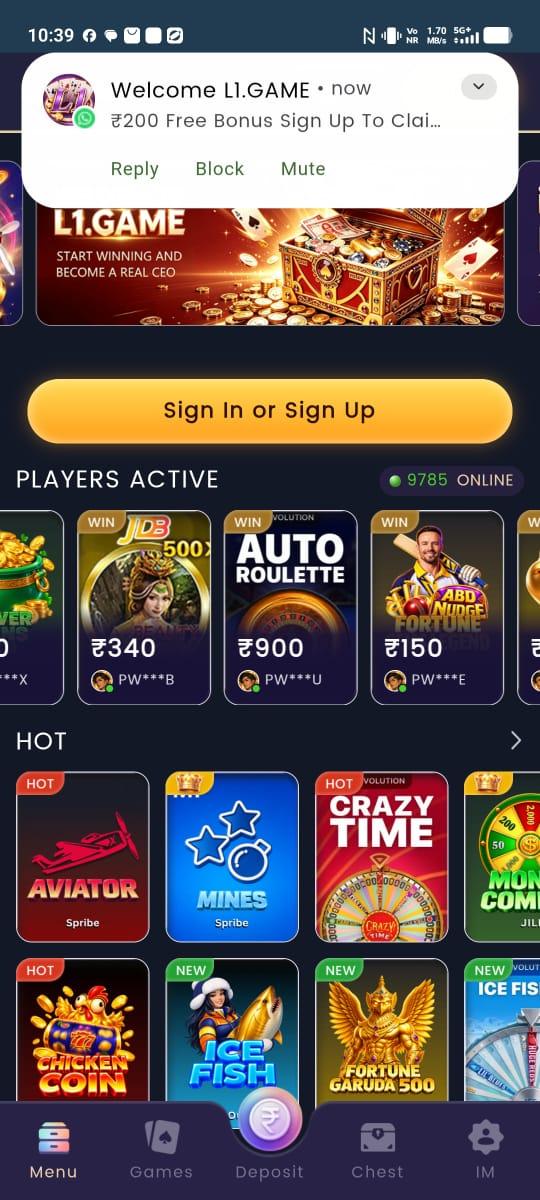
Log into your account via the app or our L1 login portal. Tap the glowing circular Deposit icon situated in the center of the bottom navigation bar (as featured in our official screenshot gallery).
Step 2: Select Your Desired Deposit Amount
Choose from the pre-configured quick amounts (₹100, ₹300, ₹500, ₹1,000, ₹2,000, ₹5,000, ₹10,000) or manually input your custom figure. Note that first-time deposits often unlock additional deposit multipliers detailed on our bonuses and promotions page.
Step 3: Choose Your Payment Channel (UPI Intent vs. QR Code)
- Option A - UPI App Intent (Recommended on Mobile): Tap your preferred app icon (PhonePe, Paytm, or Google Pay). The app will open automatically with the exact payment amount pre-filled. Enter your 4-digit or 6-digit UPI PIN to authorize payment.
- Option B - Dynamic QR Code (Recommended on Desktop/Tablet): A high-resolution dynamic QR code will generate on your screen. Open your banking or UPI app on your phone, scan the QR code, and approve the transaction.
- Option C - Manual UTR Copy-Paste: If required, copy the 12-digit UTR (Unique Transaction Reference) number from your banking receipt and paste it into the L1 cashier to instantly sync your transaction.
Step 4: Instant Balance Reflection
Return to the L1 home lobby. Your updated main balance will display immediately in the top header. You are now equipped to play your favorite titles, from Spribe Aviator strategies to high RTP slots and live casino games.
Detailed UTR Resolution: How to Fix Pending Deposits
On rare occasions, network congestion between your bank and NPCI (National Payments Corporation of India) may delay automated webhooks. Here is how to force-credit your account in under 60 seconds:
- Open your UPI application (PhonePe, Google Pay, or Paytm).
- Go to Transaction History and open the payment receipt made to L1.
- Locate the 12-digit UTR / UPI Ref ID (e.g.,
408221849102). - Copy the 12-digit number.
- Return to the L1 Deposit Cashier screen and tap "Having payment issues? Click here to input UTR".
- Paste the 12 digits and tap Verify Transaction.
- The payment gateway switch will query the central NPCI database and credit your chips instantly!
NPCI UPI Error Codes & How to Resolve Them
If your banking app returns an error code during recharge, consult this troubleshooting guide:
| NPCI UPI Code | Meaning of Error | Root Cause | Actionable Solution |
|---|---|---|---|
| U16 | Risk Threshold Exceeded | Bank flagged rapid sequential UPI requests | Wait 15 minutes before retrying or use another UPI app |
| U30 | Transaction Timed Out | NPCI switch latency spike | Check bank statement; if debited, copy UTR into app |
| ZM | Invalid MPIN | Incorrect UPI PIN entered in PhonePe/GPay | Re-enter your correct 4 or 6-digit PIN |
| Z6 | Transaction Limit Exceeded | Daily bank UPI limit (usually ₹1 Lakh) reached | Switch to another bank account or use IMPS |
| U69 | Beneficiary Bank Down | Server maintenance at receiver gateway | Switch to secondary QR code or alternate payment method |
How to Withdraw Your Winnings from L1
When you are ready to cash out your hard-earned winnings, follow these straightforward withdrawal instructions:
Step 1: Open the Withdrawal Module
Navigate to Menu > Wallet > Withdraw, or tap your balance icon in the top header and select Withdraw.
Step 2: Bind Your Payout Destination
For your security and to prevent third-party diversion of funds, you must link your verified personal banking details:
- For UPI Payouts: Enter your full legal name as it appears on your bank account and your active UPI Virtual Payment Address (e.g.,
yourname@okaxisormobilenumber@ybl). - For Direct Bank IMPS: Input your 11-digit IFSC code, bank name, account number, and confirm account number.
Step 3: Specify the Withdrawal Amount
Enter your cashout amount. Ensure that it satisfies the minimum withdrawal threshold of ₹200 and does not exceed your daily VIP limit.
Step 4: Submit & Receive Funds
Tap Submit Withdrawal. Our automated payout engine will verify the request, process the transaction through our banking partner, and credit your account typically within 1 to 5 minutes.
Indian Banking CBS Maintenance Windows: Best Times to Withdraw
Indian commercial banks routinely conduct nightly Core Banking System (CBS) batch updates. To avoid temporary bank queuing, refer to this schedule:
| Bank Name | Scheduled Nightly Maintenance Window | Expected IMPS Speed Outside Maintenance | Recommended Action |
|---|---|---|---|
| State Bank of India (SBI) | 11:45 PM - 02:15 AM IST | 1 to 3 minutes | Withdraw before 11:30 PM or after 02:30 AM |
| HDFC Bank | 01:00 AM - 03:00 AM IST | 30 to 60 seconds | Highly reliable 24/7 |
| ICICI Bank | 02:00 AM - 03:30 AM IST | 30 to 60 seconds | Optimal choice for high-volume withdrawals |
| Axis Bank | 01:30 AM - 03:00 AM IST | 1 to 2 minutes | Stable across all Indian states |
| Punjab National Bank (PNB) | 12:00 AM - 03:30 AM IST | 2 to 5 minutes | Best processed during daytime banking hours |
| Kotak Mahindra Bank | 02:30 AM - 04:00 AM IST | Under 60 seconds | Extremely fast webhook confirmations |
Understanding KYC & Account Verification Policies
To comply with financial regulatory frameworks and combat identity fraud, L1 employs an automated Know Your Customer (KYC) verification protocol:
- Basic Verification (Instant): Standard mobile phone OTP verification completed during registration allows you to deposit and withdraw up to ₹10,000 daily.
- Full Verification (High Rollers): When cumulative withdrawals exceed ₹50,000, players may be prompted to upload a photo of their government ID (Aadhaar Card, PAN Card, or Voter ID). Approval is handled automatically via optical character recognition (OCR) within 15 minutes.
- Review our editorial and security commitments in the About Us section for more details on our data protection standards.
Common Withdrawal Delay Reasons & How to Avoid Them
While 98% of cashouts clear in under 5 minutes, occasional delays can happen. Here is how to diagnose and resolve them swiftly:
1. Incomplete Wagering Turnover Requirements
- The Cause: If you claimed a promotional deposit bonus or the ₹200 registration chest reward, you must fulfill the specified playthrough turnover before bonus funds transition into withdrawable cash.
- The Fix: Review your current turnover progress under Menu > Bonus History. Play low-volatility games like *Auto Roulette* or conservative rounds of *Aviator* to complete remaining turnover quickly.
2. Typographical Errors in UPI Handle or IFSC Code
- The Cause: Entering a single incorrect digit or letter in your UPI ID or bank account number will cause the payment switch to reject the transaction.
- The Fix: Carefully double-check your banking credentials before binding them to your profile. If you made an error, contact our 24/7 customer support team to unbind and re-verify your details.
3. Bank Server Maintenance (Downtime)
- The Cause: Major Indian banks periodically perform scheduled core banking system (CBS) maintenance between 12:00 AM and 3:00 AM, temporarily rejecting IMPS traffic.
- The Fix: In such rare instances, the withdrawal will be placed in queue and processed automatically the moment the bank's API re-establishes connectivity.
Increasing Your Balance Without Depositing: The Agent Program
If your gaming budget is limited, you can build a massive, withdrawable balance entirely through the L1 affiliate program:
- Invite friends and acquaintances using your unique referral link generated in the app.
- Earn up to ₹2,000 per successful invite as friends register and make their initial deposits.
- Accumulate 1% lifetime bet rebates across all downline gaming turnover (0.85% from Level 1, 0.10% from Level 2, and 0.05% from Level 3).
- These affiliate commissions flow directly into your withdrawable wallet without any gameplay wagering requirements! Learn more on our affiliate portal.
Understanding Indian Gaming Taxes & TDS Regulations (Section 115BBJ)
A frequent point of inquiry among high-volume players on L1 is how real-money winnings and withdrawals interface with Indian taxation statutes under the Finance Act (Section 115BBJ):
- Net Winnings Calculation: Under prevailing Indian tax regulations, Tax Deducted at Source (TDS) applies strictly to net winnings at the point of withdrawal, calculated as: Net Winnings = (Total Withdrawals) - (Total Deposits) - (Prior Taxed Winnings).
- Zero Tax on Capital Deposits: Your original deposited funds are never subject to withholding deductions; you can withdraw your un-wagered principal without tax penalty subject to platform turnover guidelines.
- Annual Summary Certificates: Players requesting formal financial certificates for personal tax filing can download detailed monthly transaction statements under Menu > Financial Reports, ensuring complete transparency for their personal accounting.
- Responsible Financial Planning: Always maintain diligent records of your UPI receipts and consult a qualified chartered accountant regarding your personal financial liabilities. For more information on platform integrity and regulatory adherence, review our About Us credentials and our responsible gaming policies.
Pro-Tips for Zero-Friction Instant Payouts
To guarantee your cashouts continue to clear in 1 to 5 minutes consistently:
- Always Use Personal Accounts: Ensure your L1 name matches your bank passbook and PAN Card exactly.
- Withdraw Outside CBS Hours: Schedule your largest withdrawals between 08:00 AM and 10:00 PM IST when bank settlement servers operate at maximum throughput.
- Keep Your Primary Phone Active: Ensure your smartphone can receive SMS alerts from your receiving bank confirming the IMPS credit.
Responsible Financial Management
While real-money gaming on L1 offers real rewards, financial safety and discipline must always take priority:
- Never deposit emergency savings, borrowed funds, or money required for living essentials.
- Establish a firm daily deposit budget and stick to it regardless of wins or losses.
- Utilize the self-exclusion limits outlined in our responsible gaming policy.
- Be mindful of Indian regional regulations governing online games of skill and chance in your respective territory.
Final Thoughts & Payout Confidence
Banking on L1 is built on speed, transparent transaction logs, zero hidden fees, and robust UPI infrastructure. Get started now by downloading the certified APK on our official download page, claim your ₹200 welcome chest bonus, and experience the fastest real-money withdrawals in the industry!
Download L1 APK (v5.2.4)
Claim your instant ₹200 free signup chest and experience the lowest latency crash and slot games in India.
Frequently Asked Questions
Q1.What is the minimum withdrawal amount on L1?
The minimum withdrawal limit on L1 is ₹200. You can withdraw this directly to any valid Indian bank account via instant UPI or IMPS.
Q2.How long does a withdrawal take to reach my bank account?
Over 95% of withdrawals on L1 are processed automatically and credited to your bank account within 1 to 5 minutes.
Q3.Are there any fees or deductions on deposits and withdrawals?
No. L1 charges 0% fees on all UPI, Paytm, PhonePe, and IMPS bank transactions. You receive 100% of your requested amount.
Q4.Can I withdraw using someone else's UPI ID or bank account?
No. For security and anti-fraud compliance, the name on your L1 profile must match the registered legal name on the receiving UPI handle or bank account.
Q5.What should I do if my deposit is debited from my bank but not credited to the app?
Copy the 12-digit UTR/transaction reference number from your bank or UPI app receipt, open the L1 deposit screen, and paste it into the UTR verification box. If it does not reflect within 5 minutes, share the screenshot with our 24/7 customer support.
Specializing in Provably Fair gaming algorithms, Return to Player (RTP) mathematics, and mobile gaming security across India's real-money entertainment ecosystem.